Dashboard: Experiments
The Experiments section runs A/B tests that split live traffic across whole projects. See Concepts: Experiments for what a variant is, how the rotation picks one, and how the numbers are computed.
Navigate to /dashboard/experiments.
The Experiments entry appears in the sidebar only when the experiments
module is enabled and your role has experiments:read. With the module off
the entry is hidden; modules are turned on from the CLI
(routerly modules enable experiments, then restart the service). See
Settings: Modules.
Experiments List
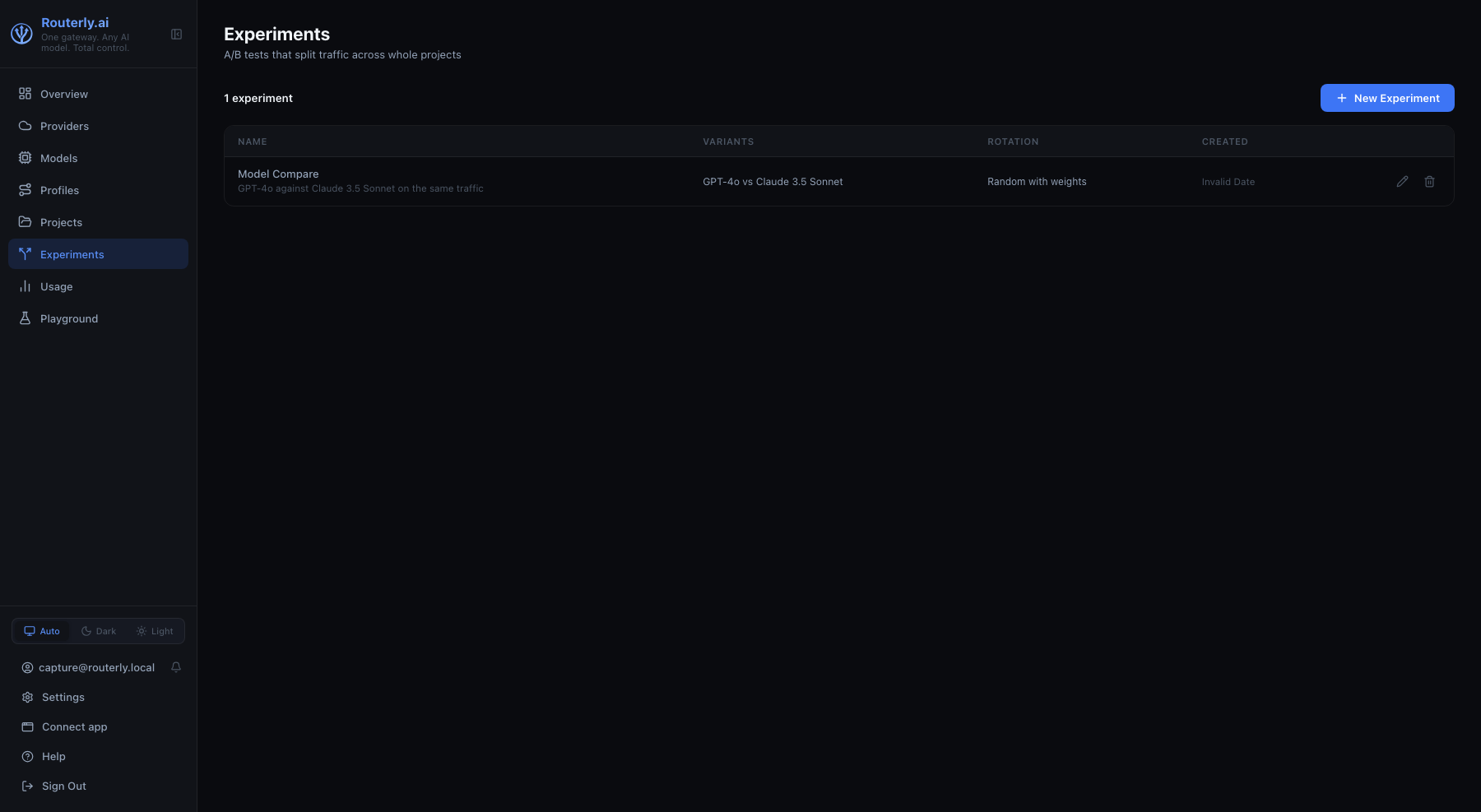
| Column | Description |
|---|---|
| Name | A link to the experiment, with its description underneath when it has one, plus a No token badge when no client can reach it yet |
| Variants | What the test compares, by name: each variant's label, or the project it routes to when it has none |
| Rotation | How traffic is split: Sticky per session, Random with weights, Round robin |
| Created | Creation date |
The counter on the left shows how many experiments there are.
Delete is the only row action, and needs experiments:manage. Clicking
anywhere else on a row opens that experiment, so there is no separate open
action.
Deleting asks for confirmation and warns that the experiment's tokens stop working immediately.
New Experiment opens the same form as the Configuration tab, on an empty
experiment. It requires experiments:manage.
Without experiments:read the page renders an explicit "no permission"
state rather than an empty list.
Experiment Detail
Opening an experiment shows its name and id, with three tabs.
Configuration Tab
The whole design of the test, and the form used to create one.
Basics
| Field | Notes |
|---|---|
| Name | Required |
| Description | Optional, what the test is trying to settle. Shown in full under the name in the list |
| Minimum calls per variant | Below this the Metrics tab marks the comparison as not conclusive. Defaults to 30 |
Traffic split
Rotation offers the three strategies, each with its own one-line explanation shown under the field. Choosing Sticky per session reveals Sticky on, which decides what identifies "the same caller".
Variants
One row per arm: the project (searchable, required), an optional label
shown in place of the project name, and, when the rotation is weighted, a
weight. The weight field shows the resulting share as a percentage, live,
so 70 / 30 reads as 70% / 30% while you type. Rows can be added and
removed; a test needs at least two.
Judge
Off by default. Enabling it reveals:
| Field | Notes |
|---|---|
| Judge model | Any configured model |
| Criteria | Free text, one per line, they go into the judge's prompt |
| Share of calls judged (%) | Percentage of the experiment's calls to score, default 100 |
Every judged call is an extra model call on your own bill, which is why the share exists.
Every field stays editable for the whole life of the experiment, including one already serving traffic. Redesigning a test that already has traffic mixes two different measurements under one set of numbers, so narrow the Metrics window to the period after the change.
Creating an experiment returns its first token once, in a green panel with a Copy button. It is not shown again.
Without experiments:manage the form is read-only and the save button is
hidden.
Metrics Tab
One row per variant, over the selected window.
The window is chosen with the same date range picker the Overview and Usage pages carry: the same presets (today, yesterday, last 7 days, this month, and so on), a custom from/to range, and All time, which is the default here since an experiment is usually read over its whole history. The counter on the left shows how many calls the window measured.
The table carries the whole comparison. The better figure of each pair is highlighted (cheaper per call, faster, higher judge score) and the percentage under a value is its distance from the best arm.
| Column | Description |
|---|---|
| Variant | Label with the project it routes to underneath, and a Low sample badge below the minimum |
| Calls | Client calls the variant served |
| Share | That variant's percentage of the calls measured in the window |
| Errors | Failed calls, with the rate |
| Tokens in / out | Prompt and completion tokens the variant consumed |
| Cost | USD across those calls |
| Cost / call | Average per call |
| Avg latency | Mean end-to-end latency |
| p95 | 95th percentile latency |
| TTFT | Mean time to first token on streamed calls, blank if none were streamed |
| Judge score | Mean judge verdict out of 10, with the judged-call count next to it |
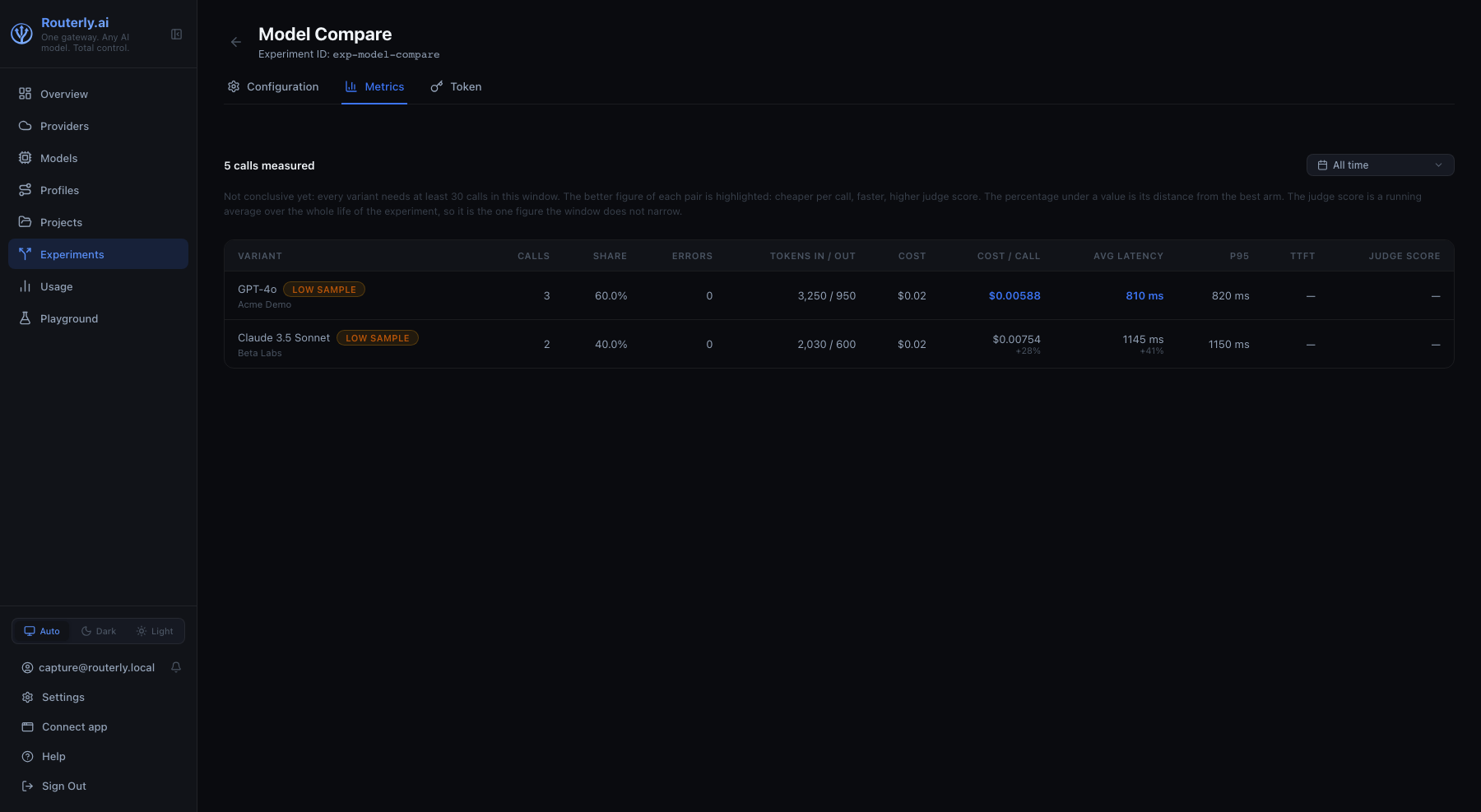
The best value in Cost / call, Avg latency and Judge score is highlighted in the accent colour. A tie highlights nothing, and a column with fewer than two comparable values highlights nothing. Under every other value of those three columns a percentage reads its distance from the best variant, so a losing arm says how much it loses by.
The judge keeps a running average per variant on the experiment itself, not a score attached to each call, so Judge score and its call count cover the experiment's whole life whichever window you pick. Every other figure on this tab is measured over the window. That is why the judged-call count can be higher than the calls measured in a narrow window.
While any variant is below the minimum, a line above the table reads "Not conclusive yet" and names the threshold. With no calls in the window at all, the tab shows an empty state pointing at the experiment token.
Token Tab
The tab opens with the base URL to point a client at, with a Copy button: it
is this instance's own address plus /v1, the same one projects use.
The tokens clients call to reach the experiment. Same shape as a project's tokens: only the first characters of each are ever shown again, with its creation date and last use.
New Token reveals the raw value once, with a Copy button. Revoke deletes a token after confirmation, and any client still using it starts failing immediately.
A client calls the experiment exactly like a project: same base URL, this token in place of a project token. Each request lands on one variant and is billed to that variant's project.
Surfaces
- Concepts: Experiments
- CLI:
routerly experiments - API: Experiments